1. Building Circuits
In this notebook we will explain step by step how to create, plot, record and load quantum circuits in \(\texttt{quimb}\) and \(\texttt{qiskit}\).
import json

import numpy as np
import quimb.tensor as qtn
from qiskit import QuantumCircuit
from qiskit.circuit.library import n_local
from qiskit.qasm2 import dumps
from qiskit_quimb import quimb_circuit

from qpe_toolbox.circuit import (
    deserialize_to_qiskit_QuantumCircuit,
    deserialize_to_quimb_Circuit,
    draw_layered_circuit,
    dump_quimb_Circuit_to_qasm,
    generate_brickwall_circuit,
    generate_rand_circuit,
    load_qasm_to_quimb_Circuit,
    serialize_from_quimb_Circuit,
)
1.1. Using \(\texttt{quimb}\)
1.1.1. Creating Custom Circuits
First, we need to specify how wide the circuit is, i.e. the number of qubits on which the protocol will be executed. We then instantiate the Circuit class to obtain an empty circuit, and append the gates of interest according to the quantum algorithm we aim to execute. \(\texttt{quimb}\) includes a list of fixed and parametrized one- and two-qubit gates that can be used for gate-by-gate construction. For example:
rng = np.random.default_rng(42)
n_qubits = 5  # total number of qubits
circ = qtn.Circuit(n_qubits)  # instantiate the class, get an empty circuit

# Hadamard gates on 2nd and 3rd qubits in 1st layer
circ.apply_gate(gate_id="h", qubits=[1], gate_round=0)
circ.apply_gate(gate_id="h", qubits=[2], gate_round=0)

# 'Rx' with angle 'pi/6' on the 5th qubit in 1st layer
circ.apply_gate(gate_id="rx", params=[np.pi / 6], qubits=[4], gate_round=0)

# CNOT from 1st to 2nd qubit in 2nd layer
circ.apply_gate(gate_id="cx", qubits=[0, 1], gate_round=1)

# 'Rzz' with angle 'pi/5' between 4th and 5th qubits in 2nd layer
circ.apply_gate(gate_id="rzz", params=[np.pi / 5], qubits=[3, 4], gate_round=1)

circ.apply_gate(gate_id="cx", qubits=[3, 4], gate_round=2)
circ.apply_gate(gate_id="cx", qubits=[2, 3], gate_round=3)
circ.apply_gate(gate_id="rzz", params=[-np.pi / 5], qubits=[1, 2], gate_round=4)
When applying each gate, we also specified the gate_round; this information can be used for multiple purposes, like visualization. \(\texttt{quimb}\) includes ready-made constructors for well-known circuits like the QAOA Ansatz, so that they do not need to be built from scratch (see the list here). We also provide some functions generating simple brick-wall and random circuits, which are the main focus of our performance notebook:
# Build a circuit with random parameters and a repeated two-layer structure;
# one layer is a single-qubit rotation, and the other is
# an entangling two-qubit gate
brickwall_circuit = generate_brickwall_circuit(
    n_qubits=10,
    depth=4,
    one_qubit_gate_label="rx",
    two_qubit_gate_label="cnot",
    rng=rng,
)

# Same as before, but the entangling layer randomly picks pairs
# of qubits at a maximum distance `two_qubit_gate_range`
random_circuit = generate_rand_circuit(
    n_qubits=10,
    depth=4,
    one_qubit_gate_label="rx",
    two_qubit_gate_label="cnot",
    two_qubit_gate_range=3,
    two_qubit_gate_prob=0.33,
    rng=rng,
)
1.1.2. Plotting Circuits
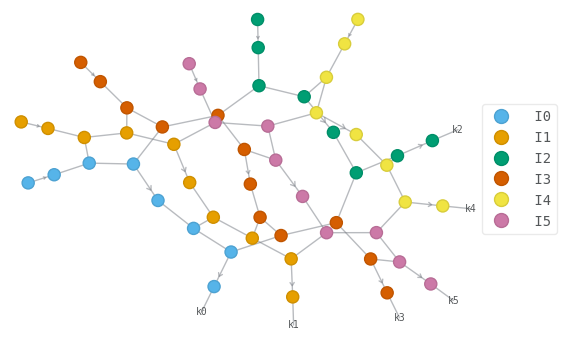
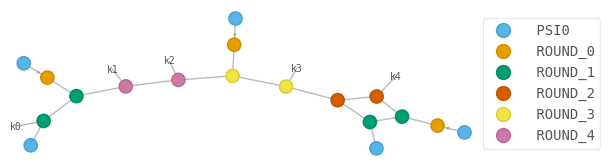
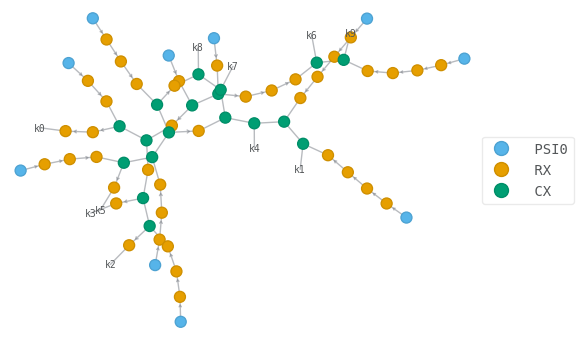
\(\texttt{quimb}\) includes visualization tools native to \(\texttt{networkx}\), designed for graphs. Therefore, if the user is interested in seeing the circuit as a graph, this is the right plotting tool. As a short example, we show how \(\texttt{quimb}\) can automatically manage coloring by labels (gate type), index (qubit position) and round (depth in which the gate was applied) in a graph layout:
# Indicate the set of tensors acting on particular qubits
brickwall_circuit.psi.draw(color=[f"I{i}" for i in range(brickwall_circuit.N)])

# Indicate the gate round
depth = max(gate.round for gate in circ.gates) + 1
circ.psi.draw(color=["PSI0"] + [f"ROUND_{i}" for i in range(depth)])

# Indicate different gates
random_circuit.psi.draw(color=["PSI0", "RX", "CX"], layout="kamada_kawai")
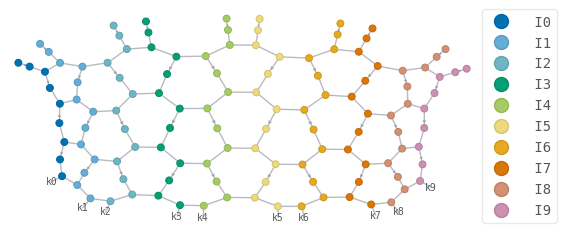
Nevertheless, to understand the details of large circuits with long-range gates, it is preferable to switch to matplotlib, as crossings of tensor legs in the network can be clarified using a fixed layout. To this end, we introduce draw_layered_circuit, which targets circuits composed of layers of single- and two-qubit rotations:
depth = max([gate.round for gate in random_circuit.gates]) + 1
fig = draw_layered_circuit(
    random_circuit,
    state_label=r"$0$",
    labels_1qubit=[f"$\\mathrm{{R_x^{{({i})}} }}$" for i in range(1, depth + 1)],
    labels_2qubit=[r"$\mathrm{CNOT}$"] * depth,
    max_depth=depth,
)
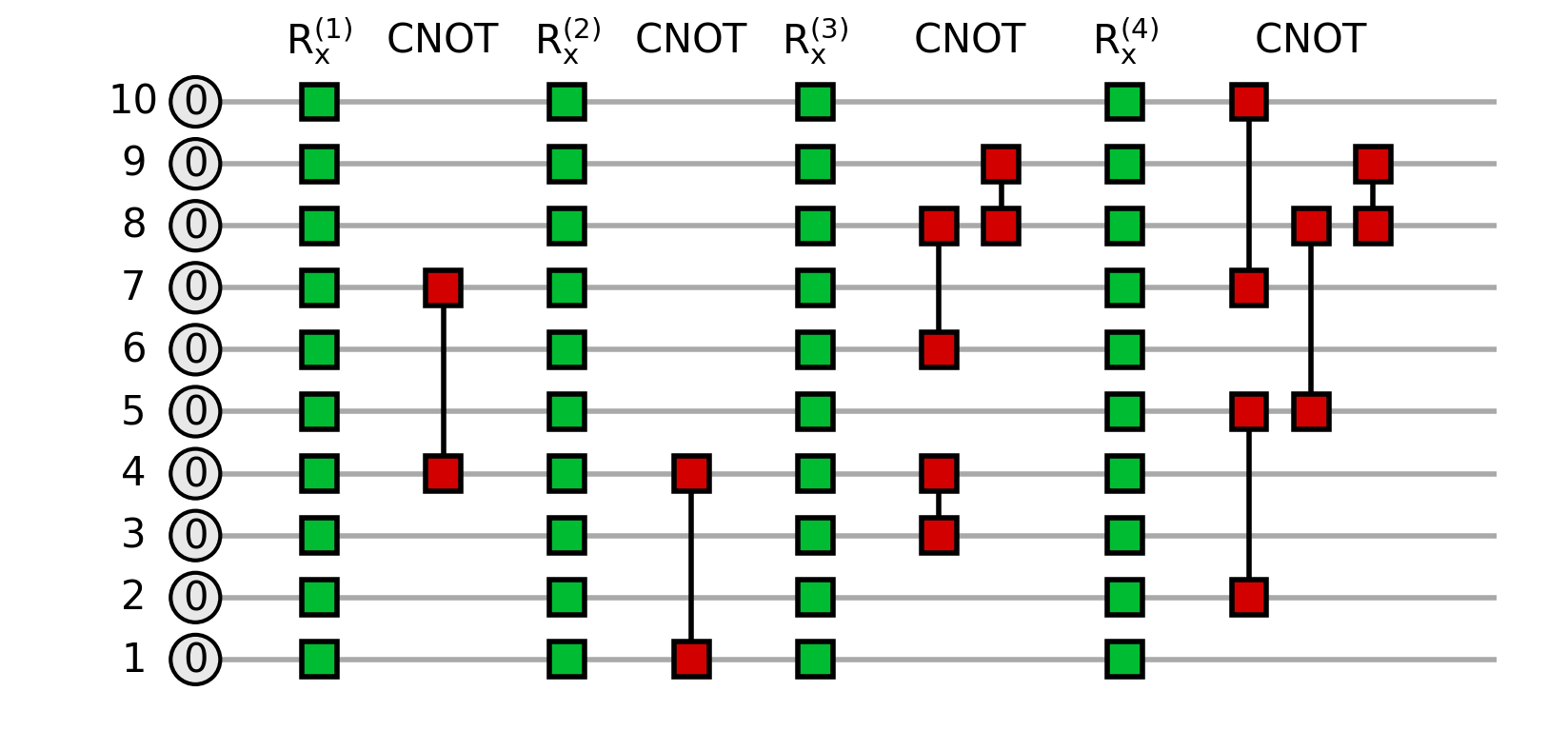
The rationale behind draw_layered_circuit is the same as that of the schematic module of \(\texttt{quimb}\), but we chose to build it ourselves for better figure scaling.
1.1.3. Recording and Loading Circuits
We are also interested in saving our circuits for later use. For some applications, researchers prefer to keep a .qasm format file with all the information on the circuit; in other cases, as we do in the performance notebook, we require a properly serialized dictionary in .json format. Both options can be automatically imported into a Circuit instance in \(\texttt{quimb}\).
We provide the following functions:
generate `quimb` circuit:
    |
    --> save it:
    |   |
    |   --> .qasm format: `dump_quimb_Circuit_to_qasm`
    |   |
    |   --> .json format: `serialize_from_quimb_Circuit`
    |
    --> load it:
        |
        --> .qasm format: `load_qasm_to_quimb_Circuit`
        |
        --> .json format: `deserialize_to_quimb_Circuit`
## Saving as `.qasm`
# Since the round information is not usually recorded in `.qasm` files,
# we added the option to save it in a separate `.txt` file
dump_quimb_Circuit_to_qasm(
    circ=random_circuit, savefile_base="example_output_quimb_circuit", save_rounds=True
)

## Saving as `.json`
# The circuit must first be serialized into a dictionary
# with JSON-compatible types
dict_circ = serialize_from_quimb_Circuit(qc=random_circuit)
with open("example_output_quimb_circuit.json", "w") as f:
    json.dump(dict_circ, f, indent=4)
Bear in mind that the structure of the dictionary generated by serialize_from_quimb_Circuit is as follows:
{
    "n_qubits": 10,
    "gates": [
      {
        "name": "RX",
        "qubits": [
          0
        ],
        "params": [
          1.2157
        ],
        "round": 0
      },
      ...
    ]
}
The reverse task of loading a Circuit can easily be done with the following functions:
# Loading from `.qasm`
loaded_quimb_circ = load_qasm_to_quimb_Circuit(
    "example_output_quimb_circuit", with_rounds=True
)

# Loading from `.json`
with open("example_output_quimb_circuit.json") as f:
    dict_loaded_circ = json.load(f)
loaded_quimb_circ = deserialize_to_quimb_Circuit(dict_loaded_circ)
1.2. Using \(\texttt{qiskit}\)
1.2.1. Creating Custom Circuits
Similarly, \(\texttt{qiskit}\) also allows for gate-by-gate construction. The same small circuit example generated for \(\texttt{quimb}\) is written for \(\texttt{qiskit}\) as:
qc = QuantumCircuit(5)

qc.h(1)
qc.h(2)
qc.rx(np.pi / 6, 4)
qc.cx(0, 1)
qc.rzz(np.pi / 5, 3, 4)
qc.cx(3, 4)
qc.cx(2, 3)
qc.rzz(-np.pi / 5, 1, 2)
<qiskit.circuit.instructionset.InstructionSet at 0x7f93741c1ff0>
The way to access the list of gates of a circuit instance is slightly different from \(\texttt{quimb}\):
for ci in qc.data:
    print(ci.operation.name, ci.qubits, ci.clbits)
h (<Qubit register=(5, "q"), index=1>,) ()
h (<Qubit register=(5, "q"), index=2>,) ()
rx (<Qubit register=(5, "q"), index=4>,) ()
cx (<Qubit register=(5, "q"), index=0>, <Qubit register=(5, "q"), index=1>) ()
rzz (<Qubit register=(5, "q"), index=3>, <Qubit register=(5, "q"), index=4>) ()
cx (<Qubit register=(5, "q"), index=3>, <Qubit register=(5, "q"), index=4>) ()
cx (<Qubit register=(5, "q"), index=2>, <Qubit register=(5, "q"), index=3>) ()
rzz (<Qubit register=(5, "q"), index=1>, <Qubit register=(5, "q"), index=2>) ()
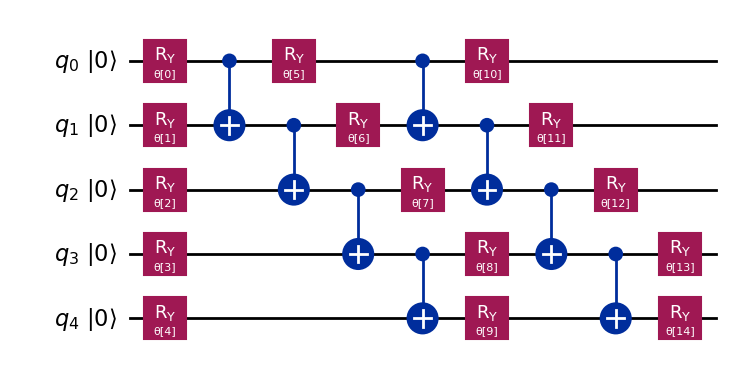
Sometimes we will be interested in generic circuit Ansätze, and we will only want to bind some values to their parametrized gates. \(\texttt{qiskit}\) provides ready-made parametrized circuits where only the parameter values need to be supplied; for example n_local:
# This function allows us to feed any entanglement pattern
# with nearest-neighbour, long-range, all-to-all or custom pairing

qc_nn = n_local(5, "ry", "cx", entanglement="linear", reps=2)

qc_lr = n_local(4, "ry", "cx", entanglement=[(0, 1), (1, 3), (0, 3), (2, 3)], reps=2)
To assign the parameters, we simply pass a list of values:
param_values = rng.uniform(0, 2 * np.pi, qc_lr.num_parameters)
qc_with_values = qc_lr.assign_parameters(param_values)
1.2.2. Plotting Circuits
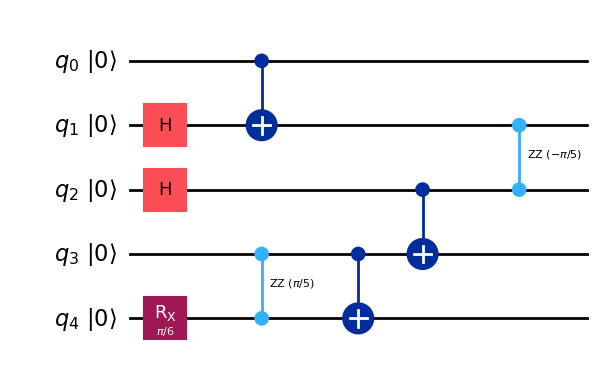
The plotting utility for \(\texttt{qiskit}\) is similar to our draw_layered_circuit function or to the schematic functionality from \(\texttt{quimb}\):
# Drawing the circuit with `mpl` output allows for coloring the gates,
# and `fold=-1` avoids breaking the circuit
qc.draw(output="mpl", initial_state=True, fold=-1)
qc_nn.draw(output="mpl", initial_state=True, fold=-1)
qc_with_values.draw(initial_state=True, fold=-1)
        ┌────────────┐               ┌─────────────┐                        ┌────────────┐
q_0: |0>┤ Ry(4.4307) ├──■─────────■──┤ Ry(0.87837) ├──────■──────────────■──┤ Ry(3.5515) ├──────────────
        ├────────────┤┌─┴─┐       │  ├─────────────┤    ┌─┴─┐            │  ├────────────┤
q_1: |0>┤ Ry(4.9055) ├┤ X ├──■────┼──┤ Ry(0.71961) ├────┤ X ├───────■────┼──┤ Ry(4.8066) ├──────────────
        ├────────────┤└───┘  │    │  └─────────────┘┌───┴───┴────┐  │    │  └────────────┘┌────────────┐
q_2: |0>┤ Ry(2.8835) ├───────┼────┼─────────■───────┤ Ry(4.1997) ├──┼────┼────────■───────┤ Ry(3.9881) ├
        ├────────────┤     ┌─┴─┐┌─┴─┐     ┌─┴─┐     └┬──────────┬┘┌─┴─┐┌─┴─┐    ┌─┴─┐     ├────────────┤
q_3: |0>┤ Ry(3.5735) ├─────┤ X ├┤ X ├─────┤ X ├──────┤ Ry(2.96) ├─┤ X ├┤ X ├────┤ X ├─────┤ Ry(3.4782) ├
        └────────────┘     └───┘└───┘     └───┘      └──────────┘ └───┘└───┘    └───┘     └────────────┘
1.2.3. Recording and Loading Circuits
A \(\texttt{qiskit}\) circuit can be recorded as a .qasm file. However, a \(\texttt{qiskit}\) QuantumCircuit has no notion of gate rounds: gates are stored as a plain ordered list, and the plotting utility simply stacks them in order of appearance. Since there is no round information to preserve, the .json recording format has no advantage over .qasm here, and we therefore do not provide a serialize_from_qiskit_QuantumCircuit function.
To handle and visualize a circuit coherently on a layer-by-layer basis, one must rely on the functions previously introduced for \(\texttt{quimb}\). Nevertheless, a .json file produced by the \(\texttt{quimb}\) pipeline can be deserialized into a \(\texttt{qiskit}\) circuit.
generate `qiskit` circuit:
    |
    --> save it:
    |   |
    |   --> .qasm format: `dumps`
    |
    --> load it:
        |
        --> .qasm format: `from_qasm_file`
        |
        --> .json format: `deserialize_to_qiskit_QuantumCircuit`
# Save as `.qasm`
# IMPORTANT: only circuits with bound parameter values can be dumped in `.qasm`
qasm_code = dumps(qc_with_values)
with open("example_output_qiskit_circuit.qasm", "w") as f:
    f.write(qasm_code)
In \(\texttt{qiskit}\) the .qasm files are loaded as follows:
qc = QuantumCircuit.from_qasm_file("example_output_quimb_circuit.qasm")
For the sake of completeness, we also introduce a deserialization from .json allowing for loading the circuit up to a given depth saved in the key "round" of each "gate":
with open("example_output_quimb_circuit.json") as f:
    dict_loaded_circ = json.load(f)
qc = deserialize_to_qiskit_QuantumCircuit(dict_loaded_circ)
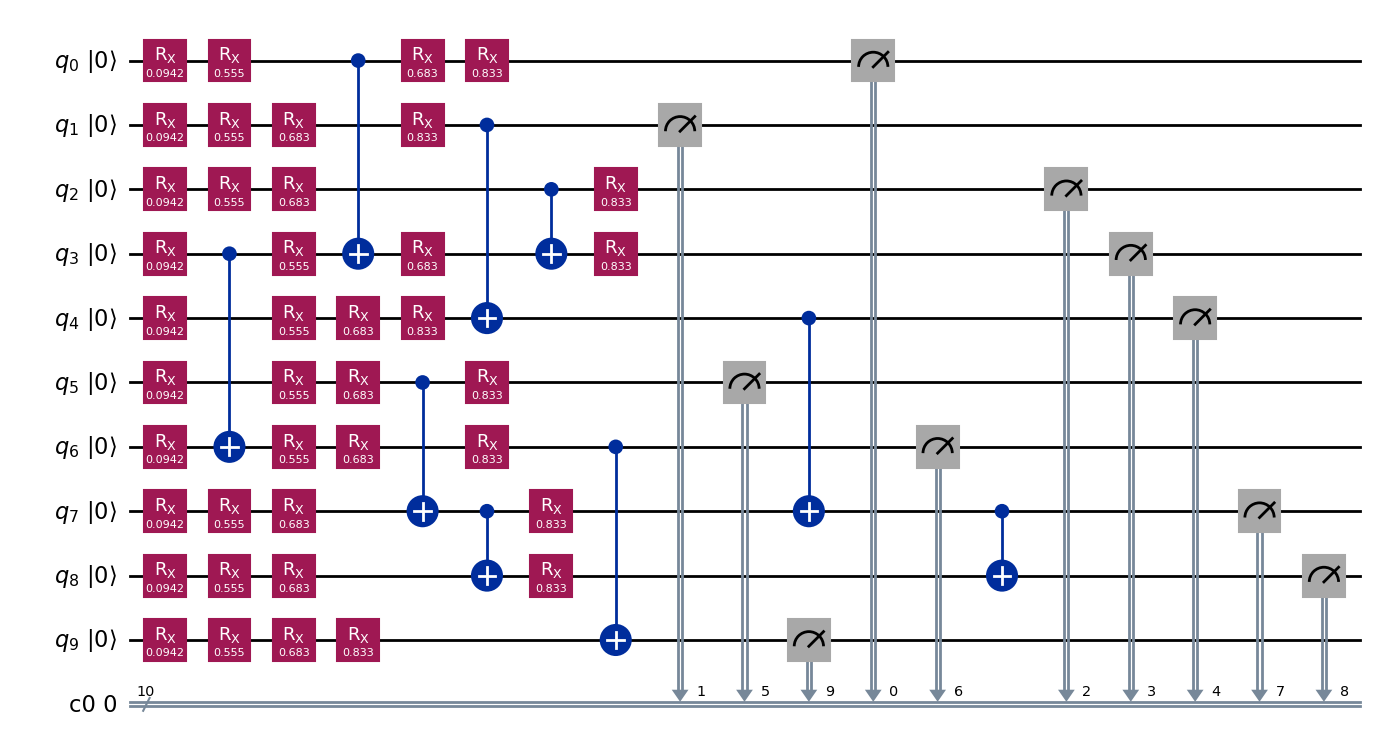
Note that whenever some observable needs to be extracted from the \(\texttt{qiskit}\) circuit instance, a layer of measurements must be explicitly called. To add measurements, set the argument measure=True in deserialize_to_qiskit_QuantumCircuit:
qc = deserialize_to_qiskit_QuantumCircuit(dict_loaded_circ, measure=True)
qc.draw(output="mpl", initial_state=True, fold=-1)
The package \(\texttt{qiskit-quimb}\) is a good option for quickly converting a \(\texttt{qiskit}\) QuantumCircuit into a \(\texttt{quimb}\) Circuit. Note that the conversion does not preserve gate round information, so the output \(\texttt{quimb}\) circuit cannot be plotted with draw_layered_circuit:
ent_pattern = [(0, 1), (1, 3), (3, 0), (2, 3), (1, 5), (4, 2), (4, 5), (5, 3)]
qiskit_circ = n_local(6, "h", "cz", entanglement=ent_pattern, reps=2)
quimb_circ = quimb_circuit(qiskit_circ)
quimb_circ.psi.draw(color=[f"I{i}" for i in range(quimb_circ.N)])